Every website wants to know what visitors do: which pages they open, what they click, and where they leave. That’s analytics. Done well, it helps a business fix confusing pages and build what people actually use. Done carelessly, it tracks people who never agreed to it.
What businesses measure
- Page views: which pages are opened, how often, and where visitors came from.
- Clicks and events: buttons pressed, forms sent, videos played, items added to a cart.
- Bounce rate: in Google Analytics, the share of visits that weren’t “engaged,” meaning they lasted under 10 seconds, viewed only one page and didn’t complete a key action.
- Heatmaps and session recordings: where people click, how far they scroll, and replays of how they moved through a page.
Popular tools
- Google Analytics 4 and Adobe Analytics: full traffic and marketing reports.
- Hotjar and Microsoft Clarity: heatmaps and session recordings.
- Mixpanel and Amplitude: product analytics, such as which features people use.
- Plausible, Fathom and Vercel Web Analytics: lighter, privacy-focused tools that count visits without building a profile of each visitor.
Why almost every site has a cookie banner
In the EU and the UK, a site generally needs your consent before it stores or reads trackers on your device, such as analytics or advertising cookies. Only strictly necessary ones, like a shopping cart or sign-in, are allowed without asking. Some regulators make a narrow exception for basic audience measurement under strict conditions, but most popular analytics setups don’t qualify. In the US, rules are lighter and vary by state: they mostly require a clear notice and a way to opt out. Many companies show one banner everywhere, which is why you see them on almost every site.
The practical rule: analytics and marketing tags that use cookies or identify visitors should stay off until the visitor says yes.
The most common mistake
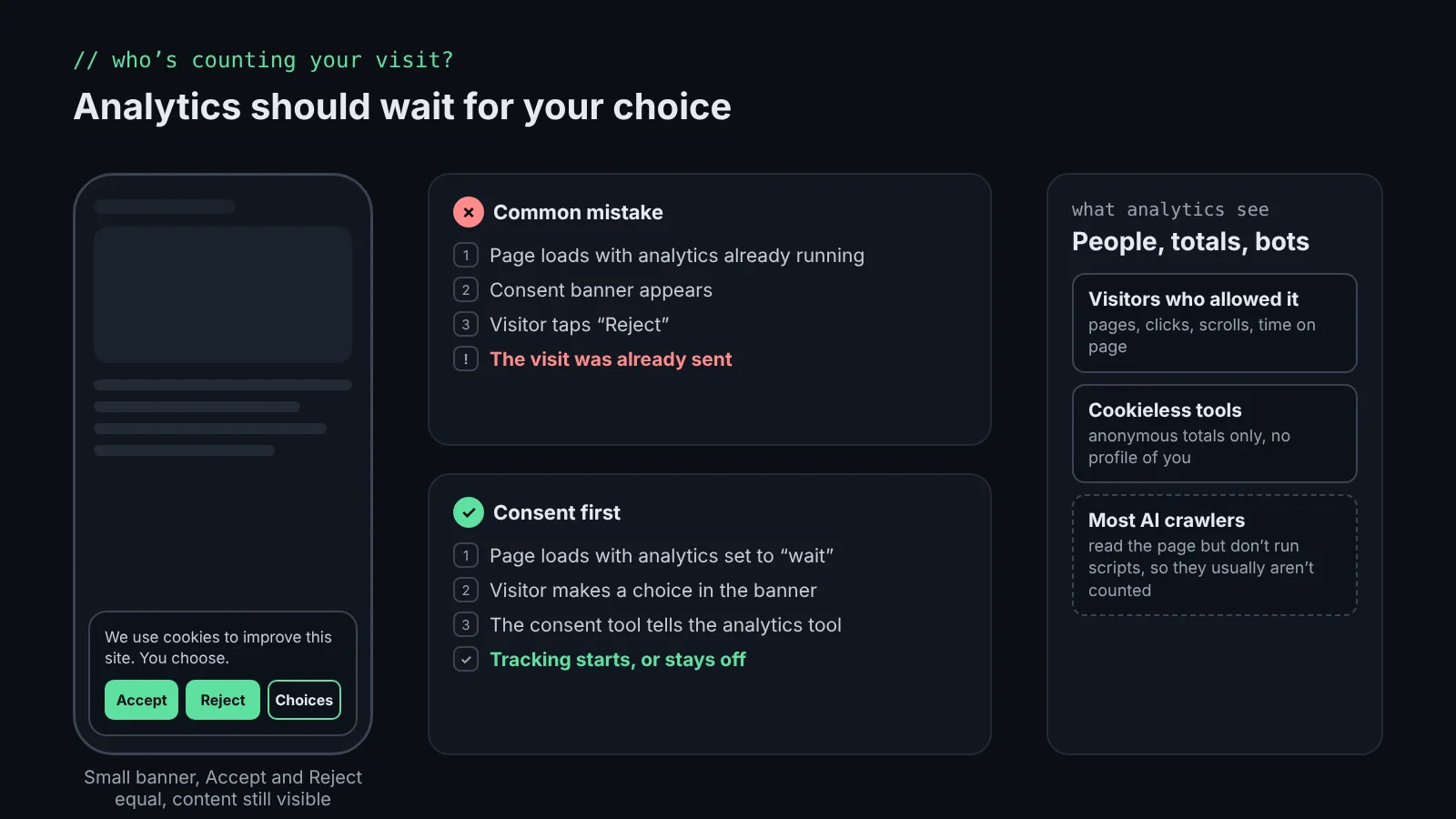
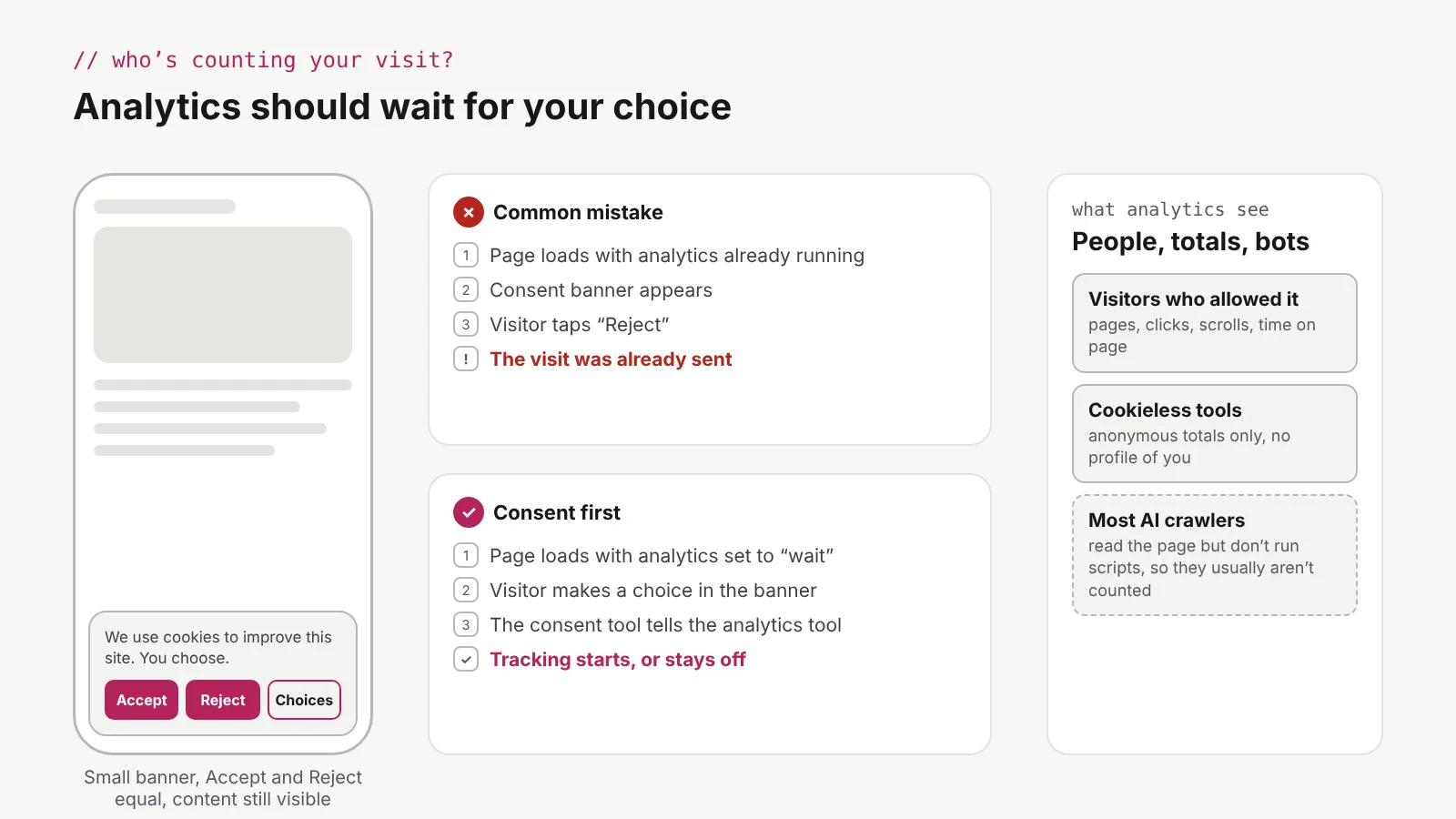
Many companies add a consent tool and assume they’re done. But a banner on its own doesn’t stop anything. If the analytics script loads with the page, the visit is sent before anyone taps a button, and “Reject” changes nothing. The consent tool has to be connected to the analytics and tag systems, and those systems have to wait for its answer. With Google’s Consent Mode, that means starting with everything denied and switching it on only after the visitor agrees:
// Runs first, before any analytics or ad tags load
gtag("consent", "default", {
  analytics_storage: "denied",
  ad_storage: "denied",
});

// Later, when the visitor taps "Accept" in the banner
gtag("consent", "update", { analytics_storage: "granted" });
On the multi-brand storefronts I worked on, the consent tool (Termly) loaded first, analytics and advertising started as denied, and the tag manager fired each tag only for the categories the shopper accepted. Each brand could change its banner through the CMS without a code change. See the cookie consent case study
Consent should be easy, not forced
Most banners sit at the bottom of the page, and many are designed so that “Accept” is the fastest way to make them disappear. On a phone, a banner can cover half the screen. Visitors are impatient: they accept just to read, or they leave. Neither is real consent, and in Europe it isn’t legal either: France’s data regulator fined Google and Facebook in 2022 because refusing cookies took more clicks than accepting them.
- Make “Reject” as easy to find and tap as “Accept.”
- Keep the banner small, especially on phones, so the content stays readable.
- Make it accessible: reachable with a keyboard, readable contrast, clear button labels for screen readers, and focus that doesn’t get trapped.
- Remember the choice, and let people change it later from a link in the footer.
How this site handles it
This portfolio uses Vercel Web Analytics and Speed Insights. They don’t use cookies and only report anonymous totals, such as page views, referring sites and device types. I can’t see who you are, and there’s nothing to accept, so there’s no banner. The privacy page explains what is collected, including how résumé links are counted and where contact form messages go. Read the privacy page
AI chats and prompts need the same care
AI features collect data too: whatever people type. In GifSpark, my AI greeting app, the support chat runs through a server, so the AI key never reaches the browser. It only answers questions about the app, keeps a short, capped message history and limits how often anyone can ask. When people describe a custom animation, the request is short and blocked if it asks for things like weapons, nudity, extra people or a changed scene. Only photos the person uploaded can be animated, and the privacy policy explains that the photo is deleted right after processing and isn’t used to train AI models. Read GifSpark’s privacy policy (opens in a new tab)
js-in-colors, my free JavaScript app for children aged 6 to 12, goes further: no accounts, no analytics, no cookies and no third-party scripts. Its AI helper blocks names, addresses, schools, emails and phone numbers before a question ever reaches an AI model. If a child says they’re sad or being bullied, it replies with a fixed, caring message that suggests talking to a trusted grown-up, and conversations are never stored or logged. Try js-in-colors (opens in a new tab)
Do analytics see people, or AI?
Most analytics tools count a visit when a browser runs their script. Many AI crawlers, the bots that read pages for AI assistants and search, download the page but don’t run scripts, so they usually don’t appear in tools like Google Analytics or Vercel Web Analytics. They show up in server logs instead. Major tools also filter known bots. But some AI agents browse with a real browser, and those can look like a person. Analytics numbers are good estimates, not an exact count of humans.
The takeaway
Analytics helps build better websites, and visitors’ trust is part of a better website. Ask clearly, make “no” as easy as “yes,” connect the consent tool to the analytics it controls, and collect only what you need.