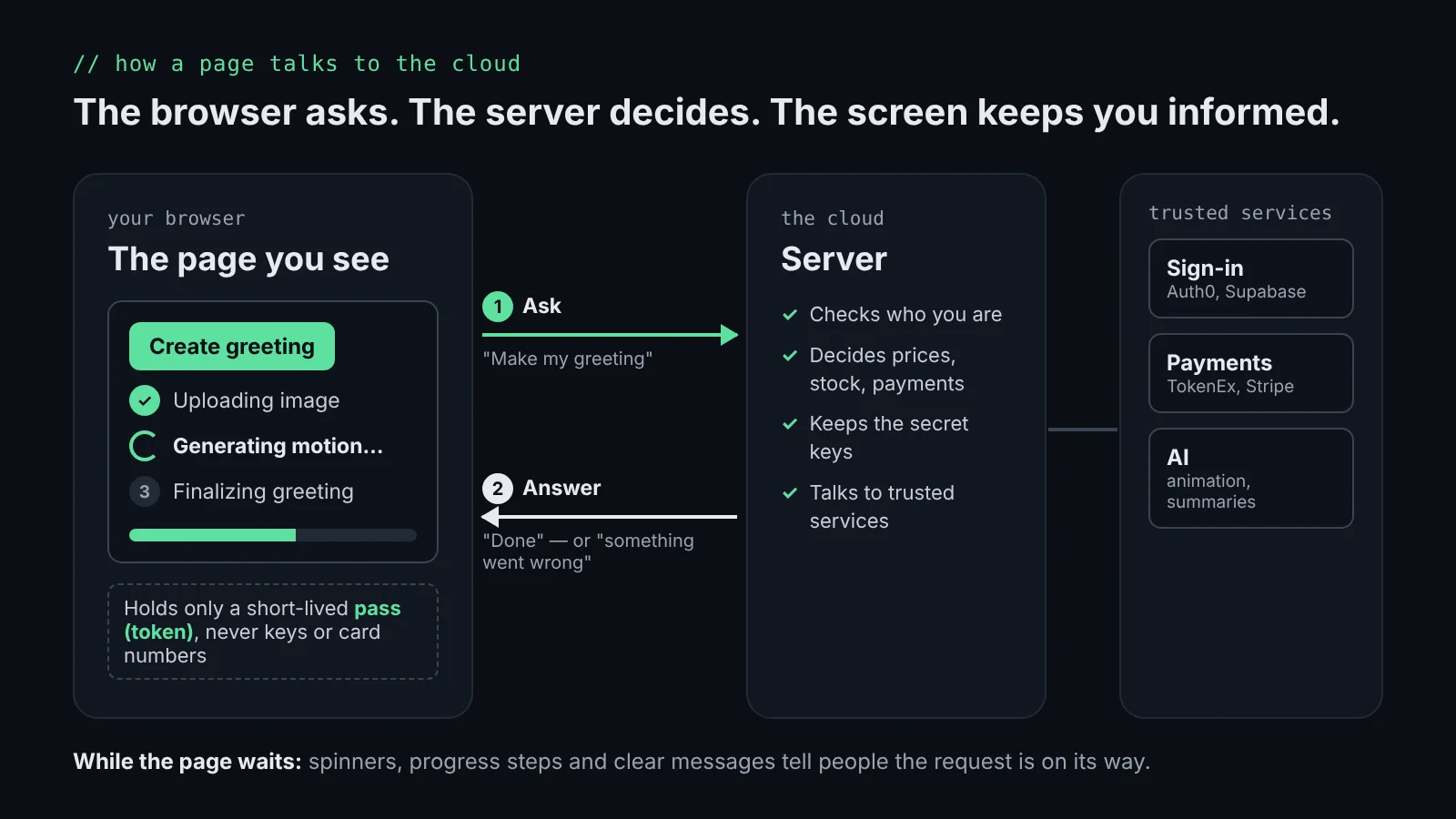
When you tap “Add to cart” or “Pay now,” the page in your browser doesn’t do the work itself. It sends a short message to a server somewhere (“add this item,” “charge this card”) and waits for an answer. The frontend’s job is to ask clearly, keep you informed while it waits, show the answer well, and protect what it touches along the way.
The browser asks, the server decides
On the ecommerce platform I worked on, the website never decided prices, stock, or whether a payment went through. It asked a server and displayed the reply. The same is true in GifSpark, my AI greeting app. That keeps the important decisions in one trusted place, and it means the screen shows the real answer, not a guess. Try GifSpark (opens in a new tab)
Waiting is part of the design
Asking a server takes time: a fraction of a second for a product list, a minute or more for an AI animation. Without feedback, people wonder whether their click worked, click again, or leave. A spinner, a progress bar or a step list all say the same thing: your request is on its way and the page is waiting for an answer.
In GifSpark, creating a greeting shows named steps instead of a blank screen, so people can see how far along it is. If a step fails, the same panel says something went wrong instead of spinning forever.
const STATUS_STEPS = [
  { key: "uploading", label: "Uploading image" },
  { key: "generating_video", label: "Generating motion" },
  { key: "finalizing", label: "Finalizing greeting" },
  { key: "ready", label: "Ready!" },
];
Payments need the same care. After checkout, the payment provider confirms the purchase to the server a moment later, so the page says “Processing your purchase… your credits are being added” and checks back until the credits appear. If it takes longer than expected, it says the payment was received and the credits may take a moment, rather than leaving people to worry they were charged for nothing.
On my online retail dashboard, “Summarize this view” asks an AI model for a short summary. While it writes, the button turns into “stop,” the panel says “Writing…,” and if the request fails, the button becomes “retry” with a plain message. Screen readers hear the finished summary, so the update is clear to everyone, not only to people who can see the screen. See the dashboard
- Waiting: show that something is happening, and how far along it is when you know.
- Success: show the result, and confirm what changed.
- Error: say what went wrong in plain words and offer a way to try again.
- Empty: when there’s nothing to show, say so instead of leaving a blank space.
Secrets never ship to the browser
Anything in a web page can be viewed by anyone who opens it. So passwords, payment keys and AI service keys stay on the server. Sign-in runs through a dedicated service such as Auth0 or Supabase, and the browser only holds a short-lived pass that proves who you are. On the dashboard, the browser sends only the tab and the filters; the server works out the numbers and holds the AI key.
Card numbers never touch our code
At checkout on the ecommerce platform, the card fields came from TokenEx, a secure payment service. When you typed your card number, our code never saw it. It got back a token, a stand-in that is useless to anyone else. In GifSpark, Stripe works the same way: Stripe’s checkout handles the card, and the app only learns that the purchase went through. The provider handles the sensitive part, and the site handles the experience around it.
The takeaway
The cloud does the heavy lifting. The frontend is where people meet it. My job is to make that moment clear, fast and safe: keep people informed while they wait, explain what happened when something goes wrong, keep secrets off the page, and let trusted services handle what they do best.